AI usage, budgets & access
Seeing what your AI spend is and who drove it, capping it with budgets, and scoping which folders and secrets each agent can touch.
Three operator controls that share a theme, knowing and bounding what your agents consume and reach.
AI usage & cost#
Oversight → AI Usage gives zero-config visibility into usage and estimated cost, broken down by agent, person, team, and model.
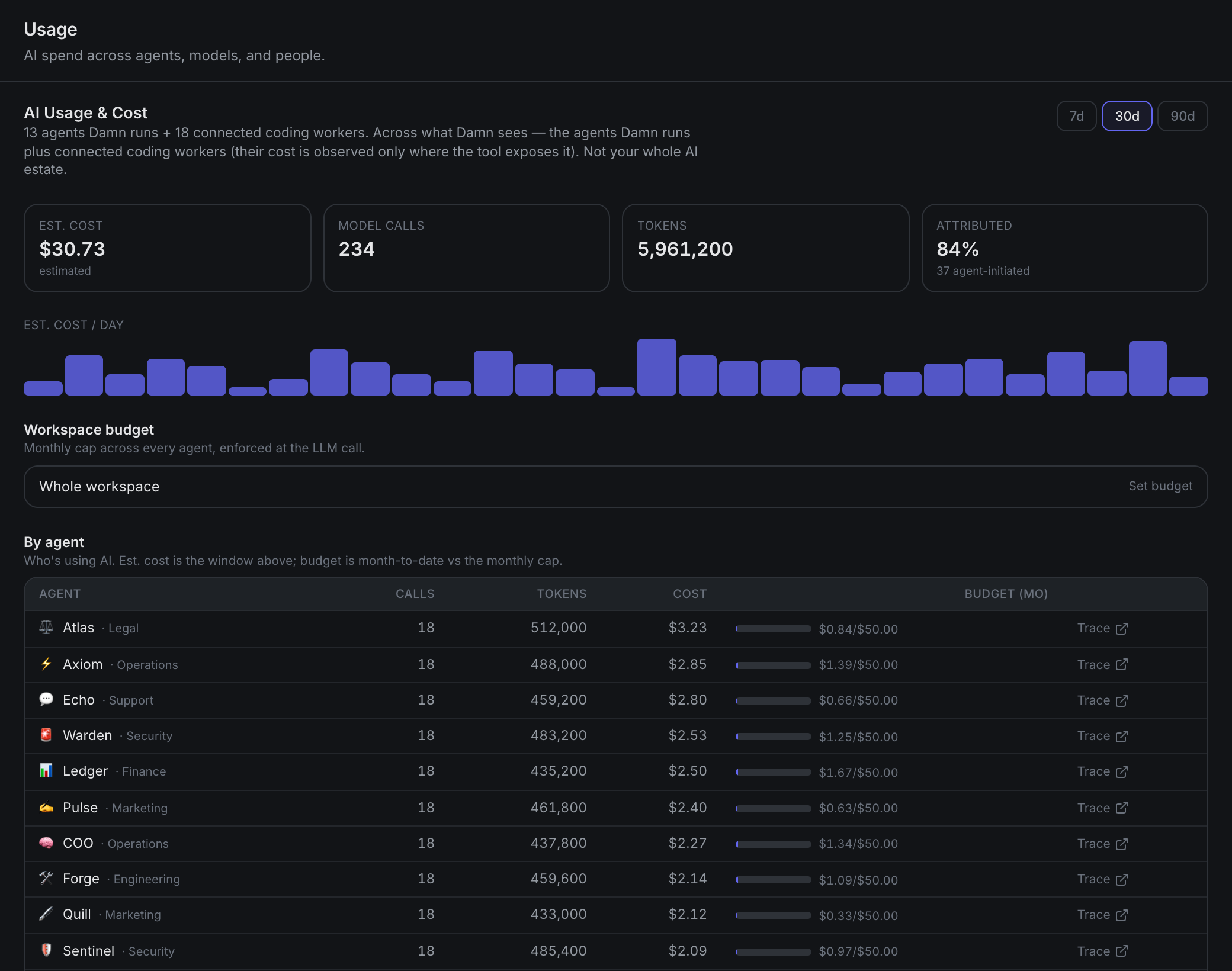
Usage reflects real per-turn token counts read from the runtime's own session (cache-aware). Cost is real for agents run through OpenClaw and estimated for other gateways. Connected coding agents that report their own cost (Claude Code) show up here too, labeled observed and kept distinct from native metered cost; subscription tools (Codex, Cursor) have no per-turn cost, so only their activity appears.
Ceiling: Cost is estimated, not billing-grade. Every token class is priced at the provider's own published rate, cached tokens included, from a catalog refreshed daily. What it still can't see: calls the provider returns no usage data for, and any discount you negotiated, since the rates are list price. Attribution is per-person where the initiator is known, otherwise per-agent or unattributed (agent-initiated chains, cron, and external ingress have no single human). Coverage is what damn.dev sees, not your whole AI estate. Don't reconcile a bill against it.
Budgets#
Set monthly USD caps at the workspace, team, or agent level. The most specific cap wins (agent over team over workspace). A breached budget stops damn.dev from starting further turns for that agent, it's a limit on what the platform will run, and it applies to agents running here.
For a limit that survives outside the platform (one that revokes the credential itself) see a key per agent below.
Ceiling: Budgets apply once you've set a policy. Per-user budgets are not a hard cap, a turn's spend belongs to the agent, and per-person cost is shown for visibility, not enforced as a limit.
A key per agent, or per connected tool#
One shared provider key across everything means one number on the invoice and no way to stop any single thing without stopping all of them. From Oversight → Registry → Keys, you can instead issue its own key to an agent you run, or to a connected tool you don't:
- You see what that one holder spent, from the provider rather than inferred.
- You set a limit on it.
- When the limit is crossed, damn.dev revokes the key, and nothing else is affected.
For an agent you run, the key is delivered to it directly and never shown back to you. For a connected tool there is no file of ours on that machine to write to, so it is shown once for the holder to paste in.
Revoking an agent you run also stops it, rather than letting it quietly continue on the shared workspace key and keep spending attributed to nobody; issue a replacement and it starts again, and there is a plain resume plus a separate "revoke and unlink". Revoking a connected tool's key cancels the credential and nothing more, damn.dev doesn't run that machine and won't claim to have stopped it.
This is the one control that works on a machine you don't own. Every agent needs a model, so the model credential is the chokepoint that exists whether the agent runs in your deployment or on somebody's laptop.
Revoking several at once#
Select any set of live keys and revoke them in one action, the answer to a provider account compromise, or to a quarterly policy. You get an outcome per key, not a single "done": anything the provider didn't confirm dead is listed separately, with the exact command to finish it yourself, because a key recorded as revoked here can still be billing.
Agents holding a revoked key stop until you issue a replacement. Connected tools keep running; their credential dies and the machine isn't ours to halt.
Replacing a key#
An agent you run can be rotated in one action: damn.dev revokes the old key, issues a fresh one, carries the limit and auto-revoke settings across, and the agent resumes on the new key. Use it for a quarterly policy, or after anyone who could have seen a key leaves.
Ceiling: No provider offers an atomic swap, so a rotation is a revoke followed by an issue. Everything that could refuse (an expired licence, a provider that won't create keys, a blocked model) refuses before the old key is touched, so a rotation that can't finish leaves you exactly where you started. The one case that can't be designed away is the provider accepting the revoke and then refusing the create: the agent is left stopped, and told so, rather than quietly falling back to the shared key.
Rotation is for agents you run. A connected tool's replacement has to be handed to a person, so there it's revoke, issue, share once. For the same reason there's no "rotate everything" button: it would quietly break several people's tooling and leave you holding secrets to redistribute by hand.
What it needs from your provider#
Providers differ, and the panel adapts rather than pretending otherwise. Where a provider allows it, damn.dev creates the key for you; where it doesn't, you paste one you made in their console and damn.dev manages it from there.
Reading spend and revoking on your behalf needs an admin credential for that provider. It's optional, and for some providers it's a credential that administers keys across your whole organization, well beyond what damn.dev runs. The panel says so where that applies. Without one you still get the inventory, plus the exact command to revoke it yourself: never a button that claims to have acted when it hasn't.
Ceiling: A limit is a tight bound, not an exact ceiling. With some providers the cap is refused at the provider itself; with others there is no such cap, and damn.dev detects the overspend and revokes, which takes a short while. Expect a small overshoot, and don't set a limit where being a few percent over is unacceptable. Spend is real money for some providers and estimated from token counts for others; the panel labels which. And revocation isn't instant, no provider documents how quickly a revoked key stops being accepted.
Issuing keys and the automatic revoke are licensed capabilities. If a license lapses, nothing already issued is revoked, no agent loses a key it's using, and the Keys view stays fully visible, only new issuing and the unattended revoke stop. Revoking by hand always works, licensed or not: a billing lapse must never leave you holding a live key you can't turn off.
Per-agent access#
"What can this agent touch?", grant specific folders (read or read/write, optionally with an expiry) and specific secrets to individual agents, from the agent's Access panel.
Ceiling: Access is default-permissive: an agent with no grants behaves exactly as before (the workspace-level scope governs). Enforcement activates per-agent / per-key only once a grant exists.
Folder grants are enforced on every install path; the strength of the underlying sandbox follows your platform (kernel-level on macOS, a physical bind on Docker), with the full per-platform detail on the Shell execution page. Secret grants are enforced everywhere (a scoped-away key fails closed, never a silent empty value) and the credential denylist is unconditional on top of all of it: a folder grant can never re-expose your keys or credential files.
Next#
- Systems & Keys, what your AI can reach, and which credential opens it.
- Shell execution & containment, the enforcement tiers under folder grants.
- Policy & enforcement, workspace-wide capability scope.